App Blocker for ADHD: Block Distractions and Focus on What Matters
Why standard app blockers fail for ADHD — and how Helpful Phone takes a different approach.
You open your phone to check the weather. Twenty minutes later, you're deep in Instagram, and you can't remember why you picked up your phone in the first place.
Sound familiar? If you have ADHD, this isn't a lack of willpower. It's how your brain works. Apps are designed to hijack attention — and ADHD brains are especially vulnerable.
Helpful Phone is an app blocker built specifically for ADHD. Instead of just blocking apps, it redirects you to your current task. Every distraction becomes a reminder of what you actually wanted to do.
Why Standard App Blockers Don't Work for ADHD
Most app blockers assume you have self-control. They show you a "blocked" screen and expect you to walk away. But for ADHD brains, that approach fails for three reasons:
The "Blocked" Screen Creates Frustration
When you see "This app is blocked," your brain registers it as punishment. You feel restricted, not redirected. This triggers emotional dysregulation — a common ADHD challenge — and makes you more likely to disable the blocker entirely.
Blocking Without Direction Leaves a Void
ADHD brains need something to do. Blocking Instagram without offering an alternative just creates a vacuum. You'll fill that vacuum with another distraction — maybe Twitter, maybe YouTube, maybe just staring at your home screen.
Shame-Based Systems Backfire
Apps that track "failed attempts" or show how much time you "wasted" reinforce negative self-talk. For people with ADHD who already struggle with rejection sensitivity, this approach does more harm than good.
How Helpful Phone Works Differently
Helpful Phone takes a different approach. Instead of punishment, it uses redirection. Instead of shame, it offers gentle reminders.
The Shield Screen: Distraction Becomes Reminder
When you open a blocked app, you don't see a "blocked" message. You see your current task.
Open TikTok? The screen shows: "Your current task: Reply to client email." Then it asks a simple question: "Will this app help you complete your task?"
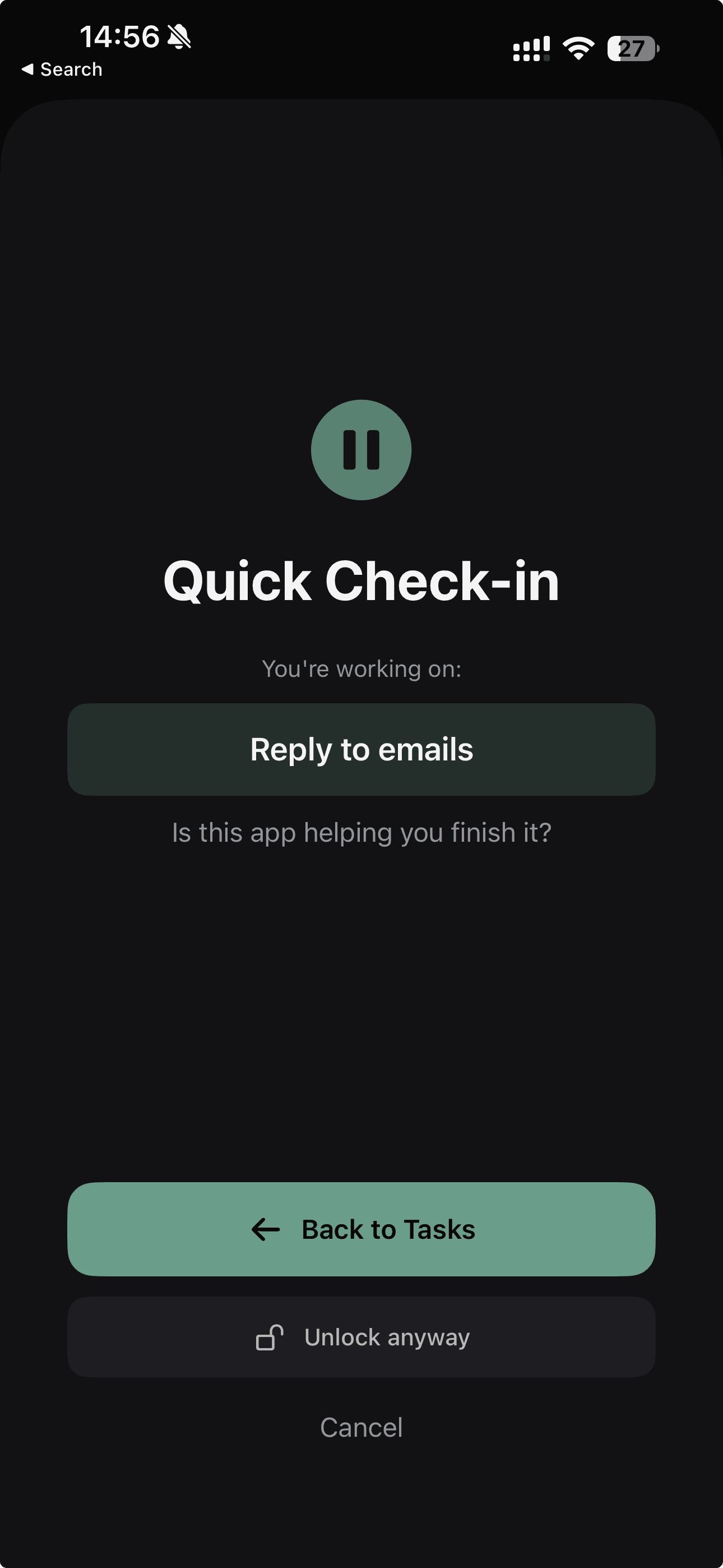
This isn't about willpower. It's about awareness. Most of the time, you didn't consciously choose to open the app — your autopilot did. The Shield Screen interrupts that autopilot and brings you back to what you actually wanted to do.
One Task at a Time
Traditional to-do lists overwhelm ADHD brains. Seeing 15 tasks creates decision paralysis — you don't know where to start, so you start nothing.
Helpful Phone shows you one task. Just one. The rest exist, but they're hidden. You focus on what's in front of you, not on everything that's waiting.
Temporary Unlock Without Guilt
Sometimes you actually need Instagram — maybe you're messaging a client or checking a specific post. Helpful Phone lets you unlock apps temporarily: 15, 20, or 30 minutes. Then blocking resumes automatically.
No judgment. No shame counter. No "you failed again" message. Just flexibility that works with real life.
Features Designed for ADHD Brains
Every feature in Helpful Phone was designed with ADHD in mind:
Big Tap Targets
All buttons are large and easy to tap. No frustration from missed taps.
Haptic Feedback
Every action gives physical feedback so your brain registers it happened.
Minimal Interface
Clean, calm, focused. Your phone shouldn't add to cognitive load.
Home Screen Widget
See your current task before unlocking — an external reminder for working memory.
Privacy: Your Data Stays on Your Device
Many productivity apps collect your data — what you block, how often you fail, your usage patterns. That data gets stored on their servers, analyzed, sometimes sold.
Helpful Phone stores everything locally on your iPhone. No cloud sync. No servers. No accounts. Your tasks, your blocked apps, your patterns — they never leave your device.
Why does this matter for ADHD? Because privacy concerns create mental overhead. Wondering "who sees my data?" is cognitive load you don't need.
Who Helpful Phone Is For
Helpful Phone works best for people who:
- Have ADHD (diagnosed or suspected) and struggle with phone distractions
- Have tried other app blockers but found them too rigid or shame-inducing
- Want a simple solution — not another complex productivity system
- Prefer one clear task over long to-do lists
- Care about privacy and don't want their data on external servers
If you're looking for gamification, social features, or detailed analytics, Helpful Phone isn't for you. It's intentionally minimal.
Getting Started
Setting up Helpful Phone takes about two minutes:
- Download the app from the App Store (free)
- Choose apps to block — select by category or pick individually
- Add your first task — just one thing you want to focus on
- Set your schedule — always block, weekdays only, or specific hours
That's it. The next time you open a blocked app, you'll see your task instead.
Frequently Asked Questions
Is Helpful Phone free?
Yes. The core features — app blocking, task management, Shield Screen — are free. No subscription required to get started.
Does it work with Screen Time?
Helpful Phone uses Apple's Screen Time API, so it integrates with iOS rather than fighting against it.
Can I bypass the block if I really need to?
Yes. You can unlock any app temporarily (15-30 minutes) or use a PIN. The goal isn't to trap you — it's to make you pause and consider.
Does it drain battery?
No. The app runs efficiently using iOS-native APIs. Most users report no noticeable battery impact.
Try Helpful Phone
If you have ADHD and your phone is a constant source of distraction, Helpful Phone offers a different approach. Not punishment. Not shame. Just gentle redirection back to what matters.
Download for iOSFree to try · No account required · 100% private